- ForexVPS offers a premium suite of professional trading tools designed to enhance strategy and performance. Features like AlgoBuilder for creating EAs from text and TrackATrader for performance analytics provide a significant value-add that goes far beyond basic server hosting.
- NYCServers stands out with its focus on a seamless user experience and aggressive pricing. Its custom control panel, featuring 1-click platform installations and auto-start functionality, make it incredibly easy for beginners to get started at a very low cost.
- While NYCServers is an excellent low-cost choice for beginners with brokers in its three specific locations, ForexVPS is the clear winner for traders seeking flexibility and growth. Its massive global network, superior resources, and professional-grade tools offer a more robust and reliable platform.
A forex trading VPS is an indispensable companion for most serious Expert Advisor and Algorithmic strategy traders. ForexVPS and NYCServers are two of the top trading VPS providers out there. In the rest of this piece, we see how they compare with each other.
- What is ForexVPS?
- What is NYCServers?
- ForexVPS vs. NYCServers: Comparison at a Glance
- ForexVPS vs. NYCServers: Core VPS Offerings
- ForexVPS vs. NYCServers: Additional Features
- ForexVPS vs. NYCServers: Plans and Pricing
- ForexVPS vs. NYCServers: User Reputation
- ForexVPS Benefits and Limitations
- NYCServers Benefits and Limitations
- Which to Choose?
- ForexVPS and NYCServers: Frequently Asked Questions
What is ForexVPS?
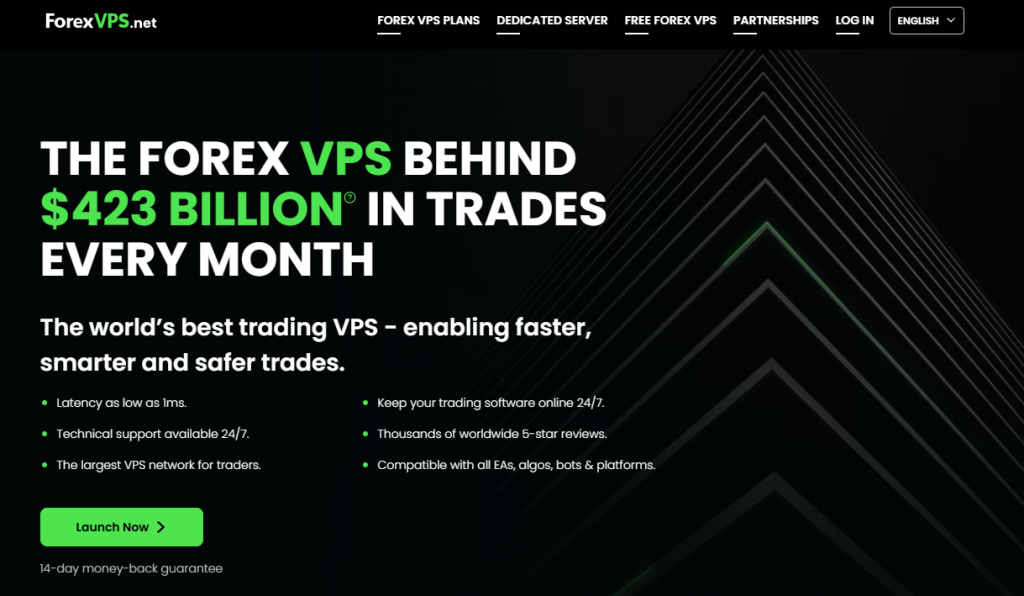
ForexVPS is a long-established trading-focused VPS provider with a global network of data centers in key financial hubs. Since its establishment in 2013, millions of traders have been served with high-performance VPS and dedicated servers.
ForexVPS offers a 99.99% server uptime guarantee, ensuring uninterrupted trading around the clock. The Uptime Institute’s Tier Classification System, the international standard for data center performance, defines 99.99% uptime as the equivalent of no more than 52.6 minutes of downtime per year, compared to 8.76 hours at the 99.9% level. And whenever traders need help, ForexVPS has a 24/7 technical customer support team trained in trading, VPSs, and Expert Advisors.
What is NYCServers?
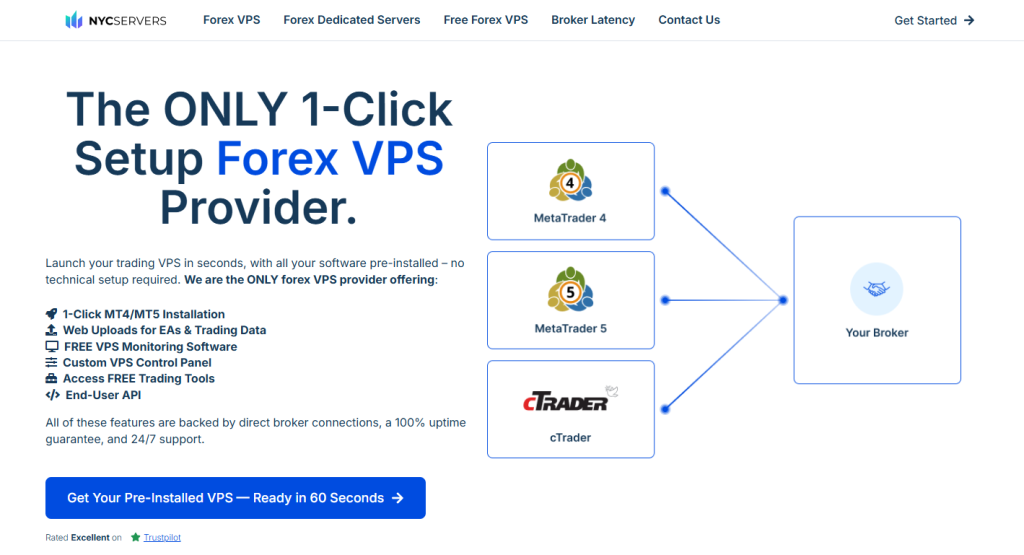
NYCServers (NewYorkCityServers) is a specialized trading Virtual Private Server provider based in Manhattan with a focus on three major financial hubs: New York, London, and Tokyo. With these three server locations, NYCServers prioritizes easy access to virtual server trading by offering a 1‑click setup with all trading software pre-installed and instant EA setup.
NYCServers is designed for forex traders who want a ready-to-go low-latency VPS (especially if you use brokers near NY or London) with user-friendly tools.
ForexVPS vs. NYCServers: Comparison at a Glance
We highlight all the core offerings of ForexVPS and NYCServers here:
| Features | ForexVPS | NYCServers | ||||
|---|---|---|---|---|---|---|
| Tier 1 | Tier 2 | Tier 3 | Tier 1 | Tier 2 | Tier 3 | |
| RAM | 4 GB | 6 GB | 8 GB | 2GB | 4GB | 8GB |
| CPU | 2 Cores | 4 Cores | 6 Cores | 2 Cores | 2 Cores | 4 Cores |
| Storage | 100 GB SSD | 150 GB SSD | 200 GB SSD | 60 GB NVMe SSD | 70 GB NVMe SSD | 100 GB NVMe SSD |
| MT4/MT5 Terminals | 1-3 | 3-6 | 6+ | 1-2 | 3-6 | Up to 7 |
| Windows Server OS | 2022/19/16 | 2022/19/16 | 2022/19/16 | 2022 | 2022 | 2022 |
| VPS Locations | 22 | 22 | 22 | 3 | 3 | 3 |
| Minimum Latency | 1ms | 1ms | 1ms | 1ms | 1ms | 1ms |
| Pricing | $32 | $48 | $64 | $20.83 | $33.33 | $40 |
| Customizable Server | Yes | Yes (But specifics not mentioned) | ||||
| Dedicated Server | Yes | Yes | ||||
| TrustPilot | 4.9 from 6600+ reviews (June 2026) | 4.4 from 110+ reviews (June 2026) | ||||
| Extra Features |
|
Custom control panel, Platform autostart and monitoring, Cybersecurity protection, and Automated backups (costs extra). | ||||
ForexVPS vs. NYCServers: Core VPS Offerings
Beyond the marketing claims, the hardware powering your VPS is what dictates its real-world performance. An EA’s effectiveness can be constrained by CPU speed, RAM availability, or storage I/O. Let’s see what both hosting service providers have to offer:
ForexVPS Core VPS Offerings
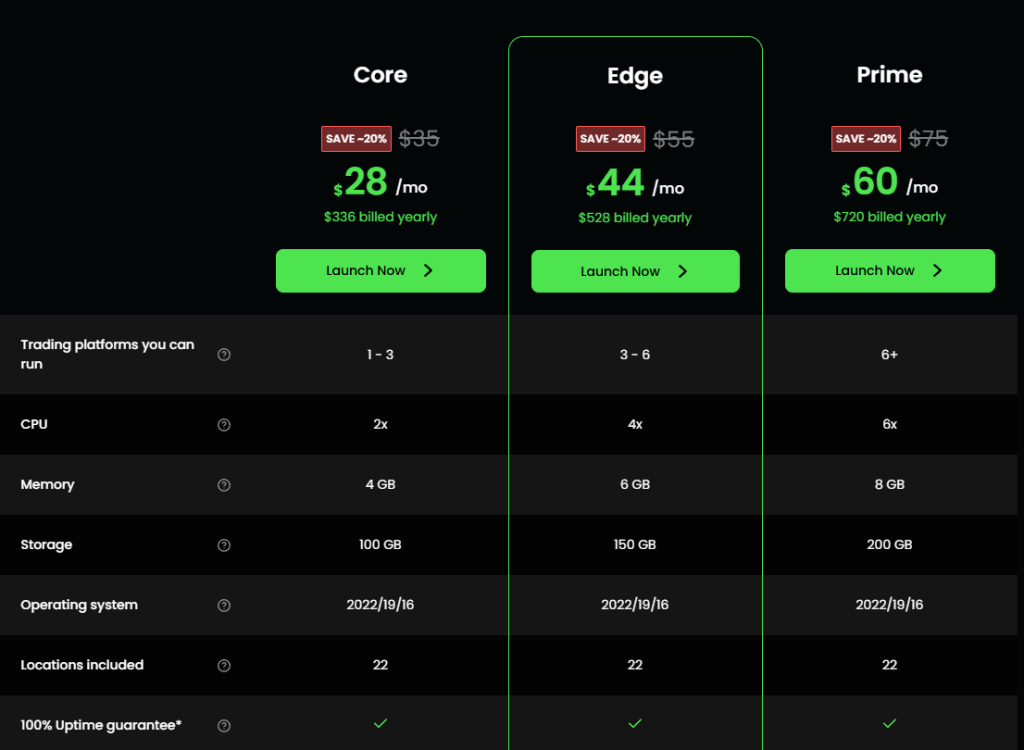
- ForexVPS runs three standard plans that cater to the needs of most traders. The Core plan offers 2 CPU cores, 4 GB RAM, and 100 GB SSD, capable of supporting up to 3 MT4/MT5 instances.
- For a few dollars more, you can upgrade to the mid-tier Edge plan, which features 4 CPU cores, 6 GB of RAM, and a 150 GB SSD. This setup conveniently handles the concurrent running of up to 6 MT4/MT5 instances.
- At the top end of the 3-part plan is the Prime plan, which boasts 6 CPU cores, 8 GB RAM, and a 200 GB SSD, sufficient for even the most demanding EA usage.
- For traders who want something in between two plans or a little higher than the Prime plan, ForexVPS also allows custom builds. With this, you get up to 10 CPU cores, 12 GB of RAM, and 250 GB of SSD storage.
- ForexVPS also has something to offer institutional traders with its high-powered dedicated servers. These traders are equipped with up to 128 GB of RAM and Xeon CPUs, along with two 2TB SSDs, capable of handling the most demanding institutional trading needs. And if they want an extra power boost, they can have one of Nvidia’s powerful GPUs added to their resources.
- When it comes to latency, ForexVPS keeps it as low as 1 ms. However, thanks to its robust network of servers in 22 data centers worldwide, ForexVPS is able to offer the best latency to all traders globally. This worldwide reach is a significant advantage if your broker’s servers are not in New York, London, or Tokyo.
NYCServers Core VPS Offerings
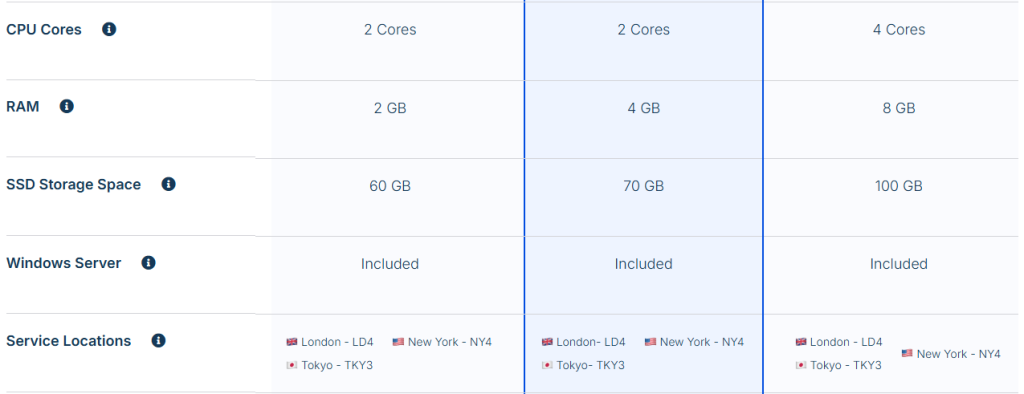
- NYCServers also matches ForexVPS with a 3-tier VPS offering. The Basic VPS starts with 2 CPU cores, 2 GB of RAM, and 60 GB of NVMe SSD storage, making it suitable for running up to 2 MT4/MT5 platforms simultaneously.
- Next is the Standard VPS, which still features the 2 CPU cores, but bumps your RAM to 4 GB and NVMe SSD storage to 70 GB. NYCServers is able to service up to 6 MT4/MT5 instances concurrently with this.
- The Professional VPS plan finally provides you with the necessary CPU upgrade, featuring 4 cores. Supporting this are 8 GB of RAM and 100 GB of NVMe SSD storage. This Professional VPS setup is more than enough for 7+ trading accounts.
- In customizable server options, NYCServers do not explicitly state what you get. However, you can send them an email to describe your specifications and get a quote.
- NYCServers provides a strong, dedicated server setup for institutional traders. The dedicated server specifications go up to 32 GB of RAM, 500 GB of NVMe SSD storage, and an Intel/AMD quad-core processor.
- NYCServers operates in only three financial centers: London, New York, and Tokyo. Traders whose brokers are located in these areas will experience latency as low as 1 ms, which is more than enough for most algorithmic trading strategies. Traders using brokers outside these three locations may see higher ping, though.
Core VPS Offering Comparison Table
Here’s a table summarizing the core VPS offerings of the forex VPS providers:
| Features | ForexVPS | NYCServers | ||||
|---|---|---|---|---|---|---|
| Tier 1 | Tier 2 | Tier 3 | Tier 1 | Tier 2 | Tier 3 | |
| RAM | 4 GB | 6 GB | 8 GB | 2GB | 4GB | 8GB |
| CPU | 2 Cores | 4 Cores | 6 Cores | 2 Cores | 2 Cores | 4 Cores |
| Storage | 100 GB SSD | 150 GB SSD | 200 GB SSD | 60 GB NVMe SSD | 70 GB NVMe SSD | 100 GB NVMe SSD |
| MT4/MT5 Terminals | 1-3 | 3-6 | 6+ | 1-2 | 3-6 | Up to 7 |
| Windows Server OS | 2022/19/16 | 2022/19/16 | 2022/19/16 | 2022 | 2022 | 2022 |
| VPS Locations | 22 | 22 | 22 | 3 | 3 | 3 |
| Minimum Latency | 1ms | 1ms | 1ms | 1ms | 1ms | 1ms |
| Customizable Server | Yes | Yes (But specifics not mentioned) | ||||
| Dedicated Server | Yes | Yes | ||||
Pound for pound, ForexVPS has the more generous resource allocations among all the tiers.
Broker Latency Comparison Table
| Broker | ForexVPS | NYCServers | ||
|---|---|---|---|---|
| New York | London | New York | London | |
| Admiral Markets | 68 ms | 1 ms | 70 ms | 1 ms |
| BlackBull Markets | 2 ms | 1 ms | 2 ms | 64 ms |
| EightCap | 3 ms | 84 ms | 64 ms | 1 ms |
| FTMO | 68 ms | 1 ms | 81 ms | 1 ms |
| IC Markets | 1 ms | 67 ms | 1 ms | 75 ms |
| Pepperstone | 1 ms | 1 ms | 1 ms | 73 ms |
| SwitchMarkets | 82 ms | 1 ms | 77 ms | 1 ms |
| Vantage | 1 ms | 1 ms | 81 ms | 2 ms |
| XM | 70 ms | 2 ms | 76 ms | 3 ms |
The multiple server locations that ForexVPS has once again shine through here, giving it the edge over NYCServers when latencies are in question.
You can check out the more comprehensive list for both brokers here:
ForexVPS vs. NYCServers: Additional Features
A great Forex VPS is more than just raw hardware; it’s an ecosystem of tools and features designed to make a trader’s life easier and more profitable. Here, the two providers diverge significantly, catering to different aspects of the trading workflow.
ForexVPS Additional Features
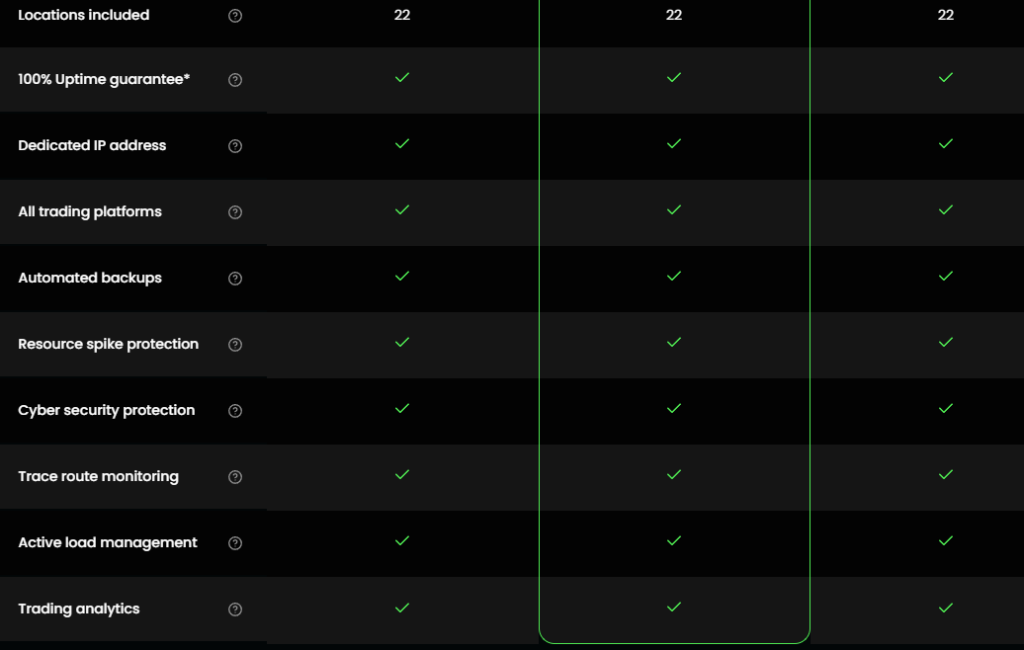
ForexVPS stands out with its unique suite of proprietary software, bundled with all its plans. These tools not only ensure the steady performance of your VPS but also enhance your trading experience.
1. Performance Analytics with TrackATrader
TrackATrader is an advanced trading analytics tool that provides insights far beyond the standard MT4 performance report. It delves into your trading history, identifies patterns in your wins and losses, and offers suggestions for optimizing your strategy. For a trader serious about continuous improvement, this is a significant feature.
Often, tools as powerful as TrackATrader can be pretty expensive, but it comes free with all ForexVPS plans.
2. AlgoBuilder
Perhaps one of the most unique features in the ForexVPS arsenal is AlgoBuilder. This proprietary tool allows you to build a fully functional Expert Advisor simply by describing your strategy using text prompts… just like you would do with ChatGPT! Not only that, Algobuilder also backtests the performance of your newly built EA.
This tool is a game-changer for manual traders looking to automate their system or for beginners who want to experiment with algorithmic trading without the steep learning curve of MQL4 or MQL5.
3. Resource Spike Protection
During high-impact news events, server load can spike dramatically as servers grapple with the sudden influx of price data. For many under-equipped servers, the next step is to freeze or completely disconnect the EA.
ForexVPS addresses this issue by automatically allocating additional CPU and RAM resources during these periods to ensure your trading platform runs smoothly at its most critical moments.
4. Trace Route Monitoring
Trace Route Monitoring continuously monitors the network path between your VPS and your broker’s server. If it detects any bottlenecks, dropped packets, or increased latency, it proactively alerts you. This allows you to identify and address potential connectivity issues before they impact your trading performance, providing an extra layer of reliability.
NYCServers Additional Features
NYCServers focuses its feature set on streamlining the deployment and management of your trading environment, prioritizing efficiency and peace of mind.
1. Custom Control Panel
Their proprietary control panel is the centerpiece of their user experience. It’s packed with tools designed specifically for traders. The flagship feature is the 1-click installation of trading platforms from over 50 different brokers. This eliminates the tedious process of manually downloading and setting up MT4/MT5. Additionally, you can choose the trading software you need, including TradingView, ForexCopier, and Python, which are automatically preinstalled on your server.
Other conveniences, such as a web-based file uploader for EAs and indicators, auto-diagnostic tools, and one-click security controls, make managing the VPS incredibly efficient.
2. Platform Auto-Start & Monitoring
Every trader has experienced the frustration of rebooting their VPS for a Windows update only to find their EAs didn’t restart. NYCServers includes free VPS monitoring and an auto-start feature that automatically relaunches your trading platforms after a reboot. This will undoubtedly ensure that your strategies are always active when the market is open.
Additional Features Comparison Table
| Features | ForexVPS | NYCServers |
|---|---|---|
| MetaTrader 4 / MetaTrader 5 | Optimized | Supported |
| cTrader | Optimized | Supported |
| NinjaTrader | Optimized | Supported |
| TradingView | Optimized | Supported |
| ThinkorSwim | Optimized | Supported |
| CME Direct Access | Server in Chicago | No |
| DDoS Protection | Yes | Yes |
| Automatic Backups | Yes | Yes (but costs $10 extra per month) |
| Additional Features |
|
Custom control panel, Platform autostart and monitoring, Cybersecurity protection, and Automated backups (costs extra). |
Despite both forex VPS server providers offering optimized support for the major trading platforms, ForexVPS appears to be the stronger option here, with a server in Chicago, which makes it a suitable choice among futures traders. In addition, ForexVPS offers a range of features that NYCServers does not.
ForexVPS vs. NYCServers: Plans and Pricing
While performance is paramount, cost is always a significant factor. Both providers offer tiered plans, dedicated server options, and “free” VPS programs through broker partnerships. However, among other things, they differ in the additional features they have. So, let’s see how all of these dynamics affect the pricing.
ForexVPS Pricing
This is how ForexVPS prices its three-tier plan:
- Core: $32 per month (billed annually) (2 CPU, 4 GB RAM, 100 GB SSD)
- Edge: $48 per month (billed annually) (4 CPU, 6 GB RAM, 150 GB SSD)
- Prime: $64 per month (billed annually) (6 CPU, 8 GB RAM, 200 GB SSD)
- The customizable server starts at $32 and ranges up to $125.
- And for the dedicated server plans, the one without a GPU costs $175/month, while the GPU version costs $399.
- Of course, you can also get access to the ForexVPS infrastructure for free if you register through one of the hosting service’s partner brokers. All you need to do is meet certain volume requirements, and the broker handles the cost.
NYCServers Pricing
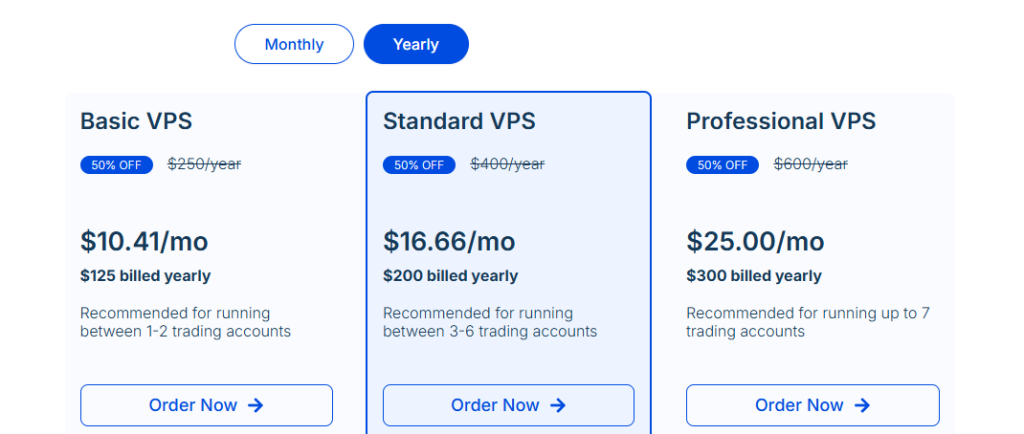
Here’s how NYCServers prices its three-tier plan:
- Basic VPS: $20.83 per month billed annually (2 CPU, 2 GB RAM, 60 GB NVMe SSD)
- Standard VPS: $33.33 per month billed annually (2 CPU, 4 GB RAM, 70 GB NVMe SSD)
- Professional VPS: $50.00 per month billed annually (4 CPU, 8 GB RAM, 100 GB NVMe SSD)
- Without any reference to the pricing on customized server plans, we don’t know much about what NYCServers offers in this regard.
- As for the dedicated server plan, it starts at $145.
- Finally, NYCServers also offers free trading VPS. They have broker partners from whom you can request a free NYCServer VPS. Once the broker approves your request, you get access for free. However, there was no mention of how the broker determines who receives a free VPS or not, or what requirements are needed to qualify for one.
Plans and Pricing Comparison Table
| Features | ForexVPS | NYCServers |
|---|---|---|
| Base Plan | $32 | $20.83 |
| Mid Plan | $48 | $33.33 |
| Top Plan | $64 | $50 |
| Customizable Plan | $32 – $125 | $20.83 – $175 |
| Dedicated Server Plan | $175 – $399 | $145.83 – $187.5 |
| Trial | No | $1 for 7 days |
| Money-Back Guarantee | 14-day | 14-day |
| Free VPS | Yes | Yes |
NYCServers wins this round with more affordable prices across the board.
ForexVPS vs. NYCServers: User Reputation
ForexVPS has built an overwhelmingly positive reputation based on a massive volume of public feedback. Their standout feedback metric is a stellar 4.9-star rating, based on over 6,600 reviews on TrustPilot (June 2026). This sheer volume of positive feedback over more than a decade only says one thing about the consistency and customer satisfaction: it’s high.
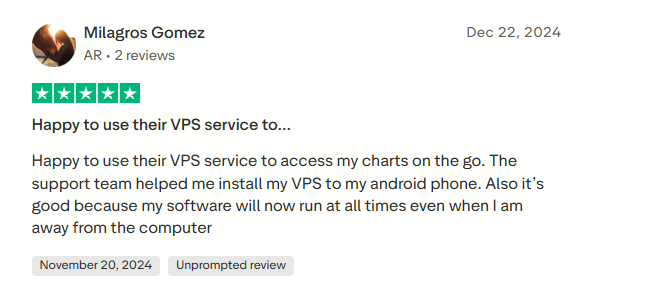
Users consistently praise their 24/7 customer support team for being not just responsive, but also knowledgeable about trading platforms. Other frequently mentioned positives include rock-solid reliability, stability during volatile market conditions, ease of setup for beginners, and dependable performance.
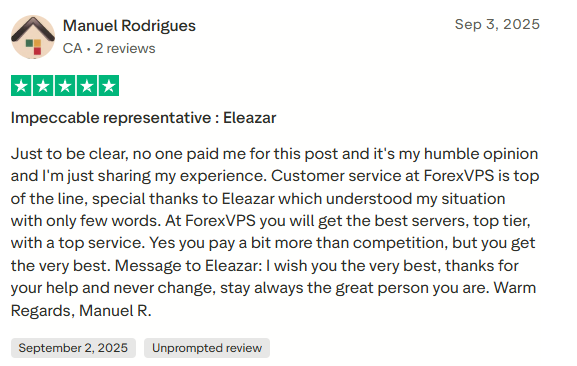
NYCServers has a rating of 4.4 out of 5, based on 110+ reviews on TrustPilot (June 2026). While many NYCServers users appreciate the performance and personal support, a few negative reviews mention billing/cancellation issues.
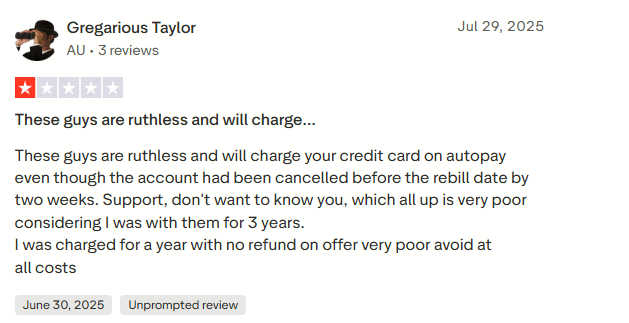
Traders also note NYCServer’s strong performance and easy setup in Forex forums and on Reddit, despite having had minor service grievances.
ForexVPS Benefits and Limitations
Let’s take a look at some of the benefits and limitations of ForexVPS:
ForexVPS Benefits
1. Unmatched Global Network
With over 22 data center locations, ForexVPS offers a low-latency solution for traders using any broker from anywhere in the world.
2. Powerful Feature Ecosystem
The inclusion of free, proprietary tools, such as TrackATrader and AlgoBuilder, adds significant value to the VPS beyond simple hosting. Other unique features, such as Resource Spike Protection, help to maintain a steady server.
3. Proven Reliability & Massive Reputation
A 4.8-star rating, based on over 5,000 TrustPilot reviews, provides unparalleled social proof, instilling immense trust in its long-term reliability in the hearts of traders.
ForexVPS Limitations
On a like-for-like basis, its standard monthly and annual pricing is noticeably higher than the rates offered by NYCServers. Even the dedicated server plans cost more with ForexVPS than with NYCServer.
That said, ForexVPS has sufficient resource allocations and additional trading features to support its pricing. Although the cost may appear high at first glance, it still offers reasonable value for money.
NYCServers Benefits and Limitations
Let’s take a look at some of the benefits and limitations of NYCServers:
NYCServers Benefits
1. Aggressive Pricing
Its pricing is among the most competitive in the Forex VPS market, offering incredible value for the level of performance it delivers.
2. Seamless User Experience
NYCservers also shines in their user experience features. For instance, the custom-built control panel features like one-click broker platform installations and web-based file uploads make server setup and management incredibly efficient and user-friendly.
You also get to have your trading tools pre-installed, including your broker’s trading platforms and even Python.
NYCServers Limitations
1. Limited Server Locations
Its specialized focus is also its main limitation. Suppose your broker’s servers are located in a hub outside of New York, London, or Tokyo (e.g., Frankfurt, Amsterdam, Sydney). In that case, you may experience higher latency than you would with a provider like ForexVPS, which has a local data center in those locations.
2. Fewer Built-in Software Tools
The service is streamlined for performance, and it does that quite well. However, it lacks the additional features that help to keep your trading experience seamless.
3. Backup Costs Extra
Automatic weekly backups cost $10/month as an add-on (where ForexVPS includes backups), so that’s an additional expense.
4. Smaller Track Record
Compared to ForexVPS, fewer user reviews and a lower Trustpilot score indicate a relatively shorter operational history and mixed user experiences.
Which to Choose?
Choose ForexVPS if:
You need global coverage and maximum power. ForexVPS is ideal for intermediate-to-advanced traders running multiple EAs 24/7 who value reliability and support. Its global data centers and robust hardware (up to 6 cores, 8 GB) make it suitable for serious automated trading.
Furthermore, you’ll benefit from its performance analytics tools and the option to get a free server via broker deals. ForexVPS also makes sense if you trade with less-common broker locations, or if you might eventually need a dedicated server for extreme workloads.
Choose NYCServers if:
You primarily trade with brokers located in New York, London, or Tokyo, and you’re on a tight budget. The $1 trial and 14-day refund make it risk-free to test. NYCServers is ideal for scalpers or EA traders seeking a turn-key solution (with one-click installs, auto-login, etc.). Its lower cost is a bonus for smaller accounts. However, double-check that your broker’s server is indeed in NY4, LD4, or TY3 – otherwise you won’t see the latency gains. These are Equinix’s carrier-neutral financial trading hubs that host direct interconnections to the majority of global forex brokers and liquidity providers.
ForexVPS and NYCServers: Frequently Asked Questions
Here are answers to some of the most common questions traders have when choosing between ForexVPS and NYCServers.
What is the main difference between ForexVPS and NYCServers?
The main difference lies in their global coverage and feature sets. ForexVPS offers a wider network with 22 data centers worldwide, more powerful hardware options, and additional proprietary tools like AlgoBuilder and TrackATrader. NYCServers focuses on three key locations (New York, London, Tokyo) with an emphasis on ease of use and competitive pricing.
Between ForexVPS and NYCServers, which VPS provider offers lower latency for forex trading?
Both ForexVPS and NYCServers provide ultra-low latency connections, especially for brokers located near their data centers. ForexVPS’s wider global network can offer better latency for brokers outside NYC, London, and Tokyo, while NYCServers excels for traders using brokers within those hubs.
Can I run multiple trading platforms on ForexVPS and NYCServers?
Yes, both ForexVPS and NYCServers support multiple trading platforms, including MetaTrader 4, MetaTrader 5, cTrader, NinjaTrader, and others. They are optimized for running several instances simultaneously, catering to traders running multiple accounts or automated strategies.
Can I get a free Forex VPS through broker partnerships through ForexVPS and NYCServers?
Yes, both ForexVPS and NYCServers have partnerships with popular forex brokers that offer free VPS hosting to qualifying traders. Requirements vary by broker, typically based on trading volume or account size.
What kind of customer support do ForexVPS and NYCServers offer?
Both ForexVPS and NYCServers provide 24/7 customer support with expertise in forex trading and VPS technical issues. ForexVPS is noted for its large support team and extensive resources, while NYCServers is praised for personalized and responsive assistance.